Address Assistant
Split and combine street address data in Excel.
A free add-in for Microsoft Excel that lists and manages your installed add-ins.
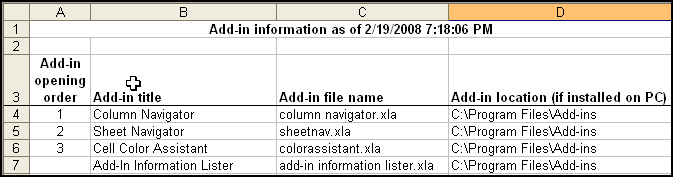
The Addin Information Lister for Excel not only provides a way to list your add-ins, but it provides easy access to installed VBA add-ins and COM add-ins. It is compatible with Microsoft Excel 2010–2021 and Excel for Office 365.
The Add-In Information Lister provides a list of all installed VBA add-ins for Excel, their file location, and their opening order.
If you un-install an add-in via Tools/Add-ins and un-checking the add-in, Excel will frequently drop the add-in from the list. If you do not know where the add-in file is located, it becomes difficult to add back. This add-in is also useful if you have gotten a new machine or are re-installing Excel, as it creates a list in a new workbook of all your installed and opened add-ins.
Managing COM add-in access is difficult to do in Excel. Unfortunately, COM add-ins frequently cause memory problems. Removal of unneeded COM add-ins that sneak into your Excel install is essential to keep Excel from crashing.
The Add-in Information Lister is free — no purchase required. Does not expire. No nag screens.
Split and combine street address data in Excel.
Clean and standardize spreadsheet data.