Data Cleaner
Clean and standardize spreadsheet data.
An add-in product for Microsoft Excel that formats cells based on many different conditional tests.
The Conditional Format Assistant add-in for Microsoft Excel is designed to help you format cells based on hundreds of different conditional tests. It is compatible with Microsoft Excel 2013-2024 and Office 365.
The conditional tests are specified on a worksheet. The following illustrates such a worksheet:
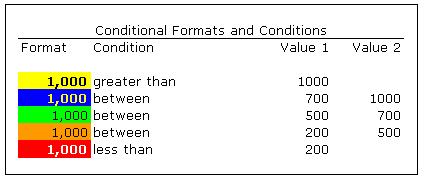
The following are the tests (numeric and text) that you can use:
The Conditional Format Assistant main dialog has a menu item titled “Create a Conditional Format Assistant worksheet” that constructs a worksheet like the one illustrated above. When you click in a cell in the conditions column, a drop down appears that gives you the above test choices.
To format cells you would select the range of cells to be formatted, select the conditional format test rows from the above worksheet, and click OK.
The Conditional Format Assistant comes with both a help file and an exercise file. The exercise file is the fastest and easiest way to learn to use the features of the Conditional Format Assistant.
The formatting done by the Conditional Format Assistant is not dynamic. If the values of formatted cells change, you will need to re-run the add-in. Nor does it increase the number of format conditional tests found in Excel.
Clean and standardize spreadsheet data.
Split and combine address data in Excel.