Address Assistant
Split and combine address data in Excel.
An add-in for Microsoft Excel that draws arrows between matching cells.
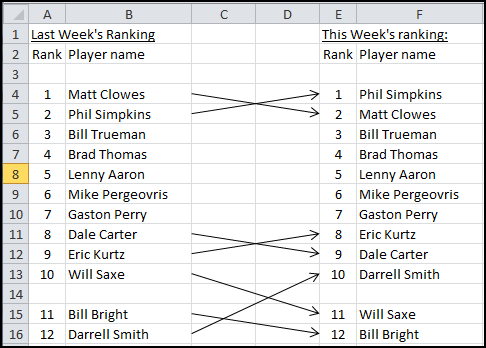
The Connect Cells Assistant add-in for Microsoft Excel helps you draw arrows between cells, connecting only the cells that should be connected. It is compatible with Microsoft Excel 2010-2021 and Office 365.
The image above illustrates a set of cells that were connected using the Connect Cells Assistant. The list on the left was last week’s chess ladder ranking. The list on the right is this week’s chess ladder ranking. The players whose position changed had arrows drawn to them. Those that did not change — for example a player who stayed at position 3 in both lists — did not have an arrow drawn. This is an option: if you wanted, you could connect all matching cells and have a number of horizontal lines running between cells.
The Connect Cells Assistant is easy to use and is completely menu driven. Download a trial version and see for yourself!
Split and combine address data in Excel.
Clean and standardize spreadsheet data.