Copy Information Assistant
An add-in for Microsoft Excel that copies information from a worksheet list to anywhere.
- Easily select and copy information in an Excel table
- Store key information and descriptions and select and copy as needed
- Use to fill in forms or do replies to e-mails
The Copy Information Assistant add-in for Microsoft Excel lets you easily copy information from Excel to any location. No longer do you need to do the search and find. Just select the entry you want and the data column and click copy. The information is copied to the clipboard and you can paste it into any form or email immediately. It is compatible with Microsoft Excel 2013–2024 and Office 365.
The Copy Information Assistant works by displaying the following dialog:
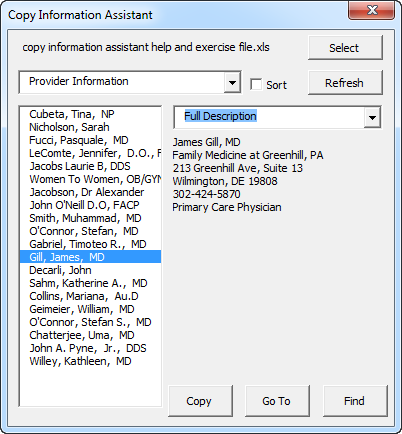
Use the Select button to select the workbook. The first dropdown is a list of all the worksheets which contain information. The second dropdown is the column descriptions. The list box contains all the entries in column A. Just select the information you want and click the copy button! Then go to the form or email and paste it!
The Copy Information Assistant remembers your last used workbook and selections, so the next time you open Excel and click on the Copy Information button on the new Specialty ribbon, it asks if you wish to use this workbook. And, if it is not open, it will open it for you! Any sheet in your workbook that has the word “info” or “information” as part of the sheet name is displayed for selection.