Address Assistant
Split and combine address data in Excel.
An add-in for Microsoft Excel that calculates loan payments and amortization tables.
The Loan Assistant add-in for Microsoft Excel is a full-featured financial tool for managing and understanding loans. It is compatible with Microsoft Excel 2013–2024 and Office 365.
With the Loan Assistant you will know in advance what your loan payments will be for any loan. It also generates amortization tables showing the amount of principal, unpaid balance, and interest by week, month, or year. Easily change information on your loan and see the results instantly — including the effect of making early payments on the interest and loan payments.
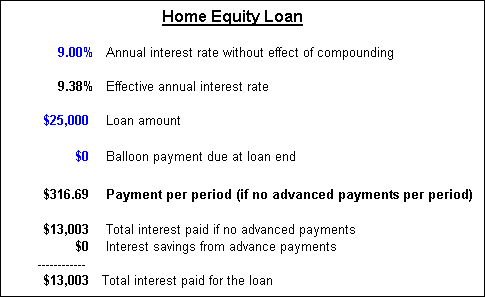
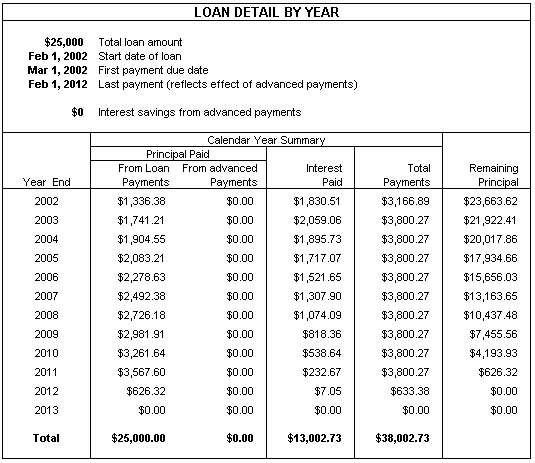
To see the detail by pay period, view the PDF file loan detail.pdf.
The Loan Assistant also lets you track principal and interest payments on existing loans. This feature allows you to:
View PDF's of the reports:
For new loans the Loan Assistant creates a detailed Excel workbook that contains:
You can change any of the loan assumptions and immediately see the impact. You can also enter advanced payments and one-time irregular payments and see how much interest you save by doing so.
In addition there is a detailed worksheet that shows the following information by payment period:
There are also loan charts that show:
Split and combine address data in Excel.
Clean and standardize spreadsheet data.