Address Assistant
Split and combine address data in Excel.
An add-in for Microsoft Excel that opens the files you want every time Excel starts.
The Startup Assistant add-in for Microsoft Excel will automatically open any list of files you want open when you open Excel. It is compatible with Microsoft Excel 2013-2024 and Office 365.
Excel does have a way to automatically open files — by placing them in the Startup Folder. However, that folder is difficult to find and navigate to, and you have to constantly move files in and out. By default, few people use it for its intended purpose. A good idea, but not properly implemented.
The Startup Assistant solves this problem. It lets you select any files you want, and it will then open these files each time you open Excel. A typical use is to open a to-do list or reference list that you know you will use.
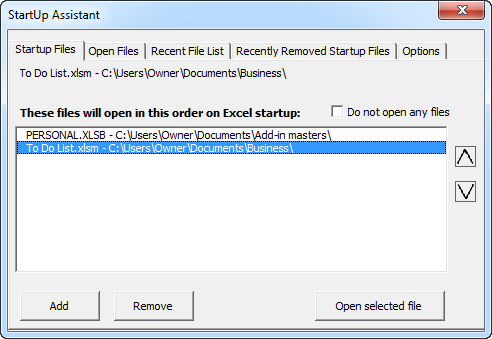
The Add button lets you select any file on your PC. The tabs at the top help you select previously opened files or files that you had on the startup list but removed. There is even a check box to stop files from being opened without removing them all from the list, and the arrows on the right let you set the open order.
The last file in the list is the one you end up on when Excel opens — in this case our to-do list, which helps us focus on what tasks need doing.
Split and combine address data in Excel.
Clean and standardize spreadsheet data.