List Assistant
Easily move cell ranges and rows around.
An add-in for Microsoft Excel that compares columns to find differences.
Compatible with Microsoft Excel 2010-2021 and Office 365.
The Compare Columns Assistant add-in for Microsoft Excel makes comparing columns in Microsoft Excel worksheets very easy. It can compare columns in a list or columns between lists.
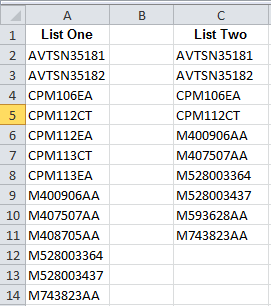
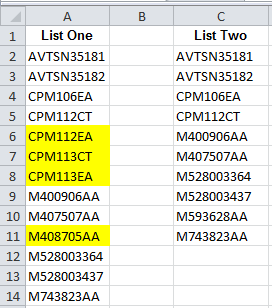
The following illustrates comparing two lists to find the entries in the first list that are not in the second list:
The Compare Columns Assistant can:
The following illustrates comparing data from two months to find differences. This comparison is a row by row comparison.
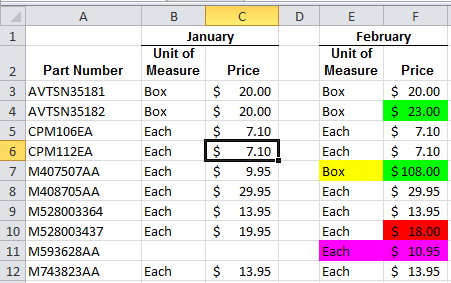
In the above, if the values go up for a part number, they are colored green. If they go down, they are colored red. If the text is different, like “each” versus “box”, the text is colored yellow. New or missing entries are colored magenta.
Easily move cell ranges and rows around.