Address Assistant
Split addresses in one cell into multiple cells. Fix zip codes needing leading zeros.
An add-in for Microsoft Excel that turns your worksheets into CSV files.
The CSV File Creator add-in for Microsoft Excel allows you to easily create CSV files from your workbooks. It is compatible with Microsoft Excel 2013–2024 and Office 365.
It is completely menu driven. From the menus, you just select the worksheets that are to be converted to CSV files and let the CSV File Creator do the work.
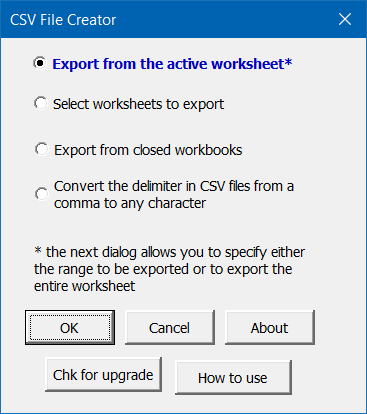
The CSV File Creator has options that let you:
Many times when you manually create a CSV file, Excel will add extra rows. The CSV File Creator solves this problem. Another feature lets you combine the entries on many worksheets into one CSV file.
“I was right in the middle of a huge data conversion project and the CSV File Creator was just what I needed to finish it. The price was right and the installation was easy. Your company provides a level of technical support not common these days. I give this company two thumbs up.” — Troy Brimm
Split addresses in one cell into multiple cells. Fix zip codes needing leading zeros.
Quickly find and go to any column via a descriptive list of all the columns.
Quickly find and remove duplicates in one list or between two lists.
View all the data on a row at one time.
Shift words from one cell to the next with the click of a button.