Address Assistant
Easily split addresses in one cell into multiple cells. Fix zip codes needing leading zeros.
An add-in for Microsoft Excel that shifts words from one cell to another.
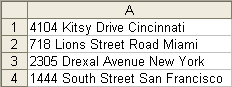
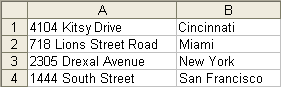
The Word Shifter add-in for Microsoft Excel lets you shift words from one cell to another with just one click. When you click on the Word Shifter button, a floating dialog appears.
To use it, just select the cells (hundreds of cells can be done at one time!) containing the words to shift and click on either the shift right or shift left button. No more manually editing cells one by one to shift words!
When cells are shifted, you can join the new words to the destination cells using a space, a comma, or any text you insert in the text box. Thus you can use the separator text you need with a simple click.
The shift of the words shown above was done in just a few seconds for hundreds of rows of data.
Easily split addresses in one cell into multiple cells. Fix zip codes needing leading zeros.
Eliminate tedious manual cleaning of data.
Quickly find and remove duplicates in one list or between two lists.
Import ASCII or text files with over a million lines!