Data Assistant
Convert tables of data into databases for pivot tables.
An add-in for Microsoft Excel that consolidates many rows of data into a few.
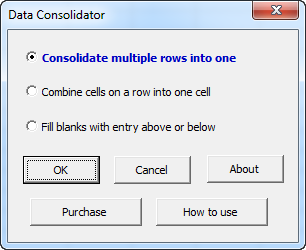
The Data Consolidator add-in for Microsoft Excel makes consolidating many rows of data into a few very easy. It is compatible with Microsoft Excel 2010-2021 and Office 365. The following is the main dialog of the Data Consolidator:
The following is an example of using the top option to combine data into fewer rows. After being processed by the Data Consolidator, a new worksheet is created that has one line for the title columns (in this case first name, last name and ID number):
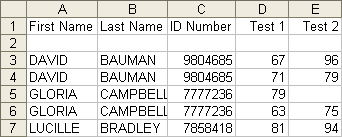

The entire process is menu driven. The title columns can be any columns you wish. The data columns can be all columns to the right of the title columns, or any set of columns you select.
The second option on the Data Consolidator, Combine cells on a row into one cell, will concatenate or combine cells into one cell. For example, the first and last names, which are in separate cells, can be combined into one. Or the scores, which are in separate columns, can be combined into one cell. You can use a space as a separator, use no separator, or specify any text you want to separate the combined entries. You can select multiple rows and multiple columns for combining.
Convert tables of data into databases for pivot tables.
Consolidate data from multiple worksheets and workbooks.