Risk Analyzer
Do decision and risk analysis the easy way.
An add-in for Microsoft Excel that automates goal seek across many cells at once.
The Multi-Cell Goal Seeker add-in for Microsoft Excel allows you to get goal seek solutions to many spreadsheet cells at one time by automating the goal seek function.
The Multi-Cell Goal Seeker does multiple goal seeks automatically — eliminate manually processing multiple goal seek solutions. It is menu driven for ease of use.
For example, assume your spreadsheet looks like the following:
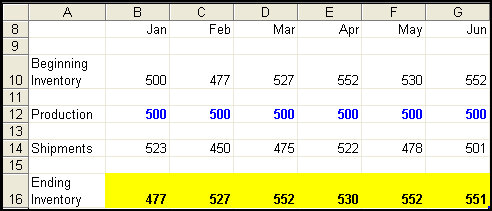
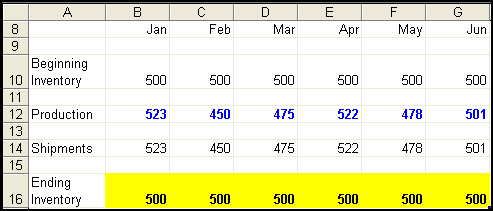
You need to set the monthly ending inventory (the yellow cells) to 500 units by varying the production (the blue and bold cells).
With the Multi-Cell Goal Seeker, you would first be prompted for the cells to be set (all the yellow cells B16:G16). Then you would be prompted for the desired value, in this case 500. If you wanted to, you could specify cells containing individual target values by month.
Lastly, you are prompted for the first cell in the range of cells that can be changed in order to achieve the goal values. This would be B12, which will be adjusted by the Goal Seeker to achieve 500 for cell B16. The Multi-Cell Goal Seeker would then modify C12 to achieve 500 for C12, and so forth. When the goal seeking is completed, the results look like the After image above.
Do decision and risk analysis the easy way.
Do numerous what-if and sensitivity analysis cases in seconds.
Easily create sensitivity or tornado charts.