Column Navigator
Quickly find and go to any column via a descriptive list of all columns.
An add-in for Microsoft Excel that finds and loads matching data between lists.
The Lookup Assistant add-in for Microsoft Excel is designed to find or look up matching data in one list and load it into another. It is compatible with Microsoft Excel 2013-2024 and Office 365.
If you have a price list of product numbers and prices in one worksheet, and in an invoice
worksheet you just have product numbers, the Lookup Assistant will match the numbers in the
invoice to those in the price list. You are given the option of either loading matching
values, inserting a simple formula (e.g. =F23), or a VLOOKUP formula to the
matching data.
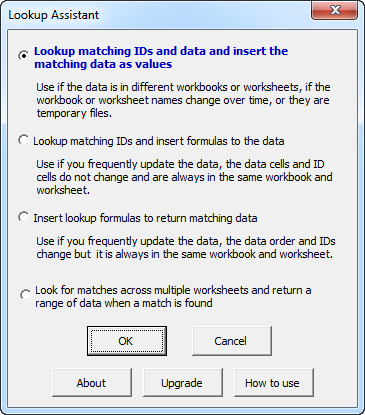
The Lookup Assistant prompts you for the cells containing the identifiers to be looked up (multiple columns may be specified, and they are concatenated), the data columns to be returned on a match, the identifiers for the data so they can be searched, and the starting destination column for the matched data.
Several options help you determine what was loaded or not loaded: color the loaded data green, color IDs that were not matched, and place a text comment on the rows of the lookup values to indicate if a match was found. The Lookup Assistant is fully menu driven and comes with a help file and an exercise file with step-by-step instructions.
“After 18 hours of wading through 6,000 lines of a 40,000 product database I had almost given up entirely. Within 15 minutes of installing the add-in I had completed the database restructure! I can’t thank you enough for this excellent addition to Excel!” — Mark Reid
Quickly find and go to any column via a descriptive list of all columns.
Make Excel data loading easier.
Quickly find and remove duplicates in one list or between two lists.
Add over 200 time saving features to Excel.
Extract rows of data into columns for easy review and printing.