Backup Assistant
Automatically backup files when you open them and before you modify them.
An add-in for Microsoft Excel that converts a row of data into columns.
The Row Extractor add-in for Microsoft Excel quickly and easily converts the data on a row of data into a column of data. This makes it easy to view or print out. It is compatible with Microsoft Excel 2013-2024 and Office 365.
To use, just select cells on one or more rows (yes, multiple rows are allowed), set the options you want and you end up with the data extracted to columns where it is easy to view. For example, if you wanted to see the data on the following worksheet for row 4:
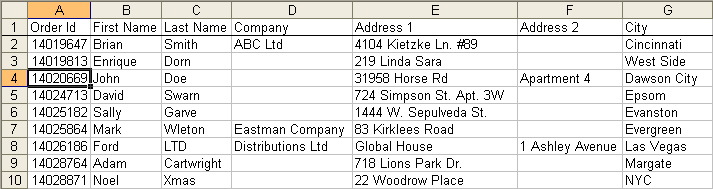
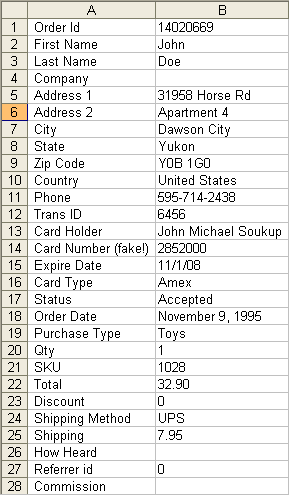
The Row Extractor easily extracts them to another worksheet. You may select one row or multiple rows and have the data extracted.
Automatically backup files when you open them and before you modify them.
Create your own toolbar of buttons to quickly and easily format cells and rows.
Quickly find and go to any column on a worksheet via a descriptive list of all columns.
See a list of the past 100 files you have opened and easily re-open any file.
Move from sheet to sheet with great ease and view a list of all your sheets with one click.
Add over 200 time saving features to Excel.