The Solver Add-in for Excel
The Solver add-in for Microsoft Excel comes with Microsoft Excel. An add-in is simply a hidden workbook that adds commands or features to Excel.
Typically the Solver add-in is not installed when Excel is installed. To see if this is the case for your machine do the following:
- Excel 2003 and earlier: select in Excel the Tools Menu and the menu item Add-ins.
- Excel 2007: Office Button, Excel Options, Add-ins, Manage Excel Add-ins in the selection box, then click GO.
- Excel 2010: Green File, Options, Manage Excel Add-ins in the selection box, then click GO.
A dialog like the following will appear:
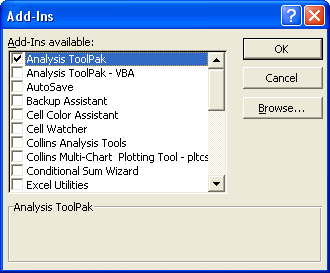
You normally will see the Solver Add-in in the list. However when you click on its checkbox and then the OK button you are asked to install the Add-in. If you need to use it, you should say “yes”.
For directions on using Solver view this tutorial.
Alternative to Solver
Many Excel users need to do simple goal seeking versus using Solver. Often users need to do multiple goal seek solutions. If this is your situation check out the Multi-Cell Goal Seeker.