Sheet Navigator
Move from sheet to sheet with ease. View a list of all your sheets with one click.
An add-in for Microsoft Excel that lets you create your own one-click cell-formatting buttons.

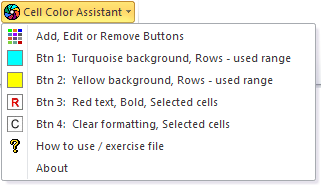
The Cell Color Assistant add-in for Microsoft Excel helps you color cells quickly and easily, and lets you select cells based on cell format. It is compatible with Microsoft Excel 2013-2024. When installed, it is added to its own ribbon tab.
Clicking on the Cell Color Assistant button displays a dropdown menu. You can add up to 20 customized buttons — when you click a button, the selected cells are formatted exactly the way you want.
You can also specify whether just the selected cells are formatted, or entire rows or columns — even when only one cell is selected.
Move from sheet to sheet with ease. View a list of all your sheets with one click.
Add over 200 time-saving features to Excel.
Extract rows of data into columns for easy review and printing.