Cell Color Assistant
Create your own toolbar of buttons to quickly and easily format cells and rows.
An add-in product for Microsoft Excel that makes moving from sheet to sheet easy and fast.
The Sheet Navigator add-in for Microsoft Excel makes moving from sheet to sheet easy and fast! It is compatible with Microsoft Excel 2010-2021 and Office 365.
With the click of a button a dialog displays a list of all the sheets in a workbook.
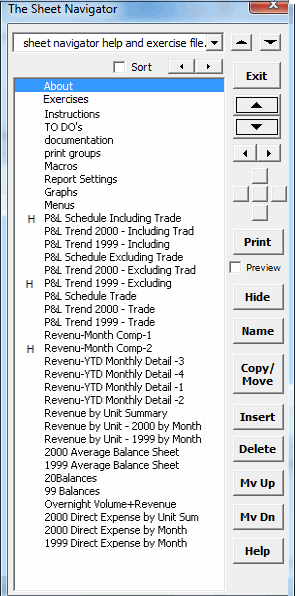
The “H” besides a sheet name indicates it is hidden. To unhide a hidden sheet, just click on it! To re-hide, select it and click the Hide button.
You can easily:
The top dropdown buttons allow you to change from sheet to sheet. The large spinner buttons allow you to go from sheet to sheet with just a click. The small spinner buttons change the zoom setting of the sheet. And the five small buttons allow you to scroll around the sheet.
Create your own toolbar of buttons to quickly and easily format cells and rows.
Easily lock and unlock worksheets.
Add over 200 time saving features to Excel.
Extract rows of data into columns for easy review and printing.