Address Assistant
Easily split addresses in one cell into multiple cells. Fix zip codes needing leading zeros.
An add-in for Microsoft Excel that splits names in one cell into individual columns.
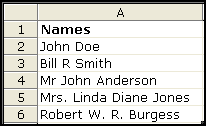
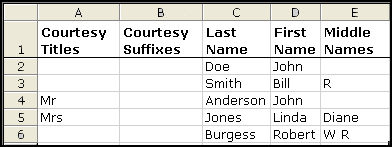
The Name Splitter add-in for Microsoft Excel can quickly and easily split names that are in one cell into individual names in individual cells. It is compatible with Microsoft Excel 2013–2024 and Office 365.
The Name Splitter has over 150 courtesy titles and suffixes (including military titles) that it looks for and puts in the courtesy titles and suffixes columns. And you can easily create and use your own custom list of titles and suffixes.
Another feature converts a list of names in “Last Name, First Name” order to “First Name Last Name”. If you have company names mixed in with your people names, the Name Splitter has several options to prevent them from being modified.
In addition to splitting names, the Name Splitter can also separate names from addresses. For example, if a cell contains “George Burdell 1 Techwood Drive”, the Name Splitter can split this into “George Burdell” in one cell and “1 Techwood Drive” in another.
Lastly, if you need to combine the split names back together, there is a feature that does just that — allowing you to put the name in the order you want, using only the parts you want, for example going to first name last name only.
Easily split addresses in one cell into multiple cells. Fix zip codes needing leading zeros.
Create CSV files the easy way, without Excel's warning messages.
Eliminate tedious manual cleaning of data.
Quickly find and remove duplicates in one list or between two lists.
Shift words from one cell to the next with just the click of a button.