Column Navigator
Quickly find and go to any column on a worksheet via a descriptive list.
An add-in for Microsoft Excel that automatically backs up your workbooks.
The Backup Assistant add-in for Microsoft Excel is designed to help you make backup copies of your workbooks before you make changes to them. One of its most useful features is to prompt you to backup a file immediately after it is opened. It is compatible with Microsoft Excel 2013-2024 and Office 365.
Eliminate the worry about messing up a file and not having an up-to-date backup.
“One of the college students working for us, Sarah, set the Backup Assistant to back up files once a day upon opening. Near the end of the Fall semester a workgroup member trashed her Excel project workbook and they thought all was lost. Then Sarah realized the Backup Assistant was still running, automatically backing up files once a day. She opened that day’s backup and found they had not lost their work after all!”
To use, just click the Backup Assistant button to display the main dialog:
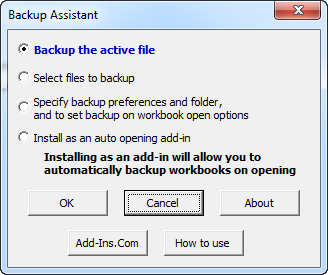
The first two options allow you to either backup the active file or to backup a group of files. The third group option allows you to set backup preferences and on-workbook-open options. Backup on open is a very powerful feature — we use it to backup all of our workbooks when they are first opened each day. The backups are saved to a target folder with the file name and the date, for example “Sales Data 2010 09 23.xls”.
The third option displays a dialog that allows you to:
The Backup Assistant is completely menu driven. The menus are easy to follow and use. To help you learn how to use the features, there is a help and exercise file to give you hands-on practice — just click the How to use button on the main dialog.
Quickly find and go to any column on a worksheet via a descriptive list.
See a list of the past 100 files you have opened and easily re-open any file.
Extract rows of data into columns for easy review and printing.
Move from sheet to sheet with ease. View a list of all your sheets with one click.
Add over 200 time-saving features to Excel.