Backup Assistant
Automatically backup files when you open them and before you modify them.
Part of the Spreadsheet Assistant — a menu full of editing features for Microsoft Excel.
The following is the Edit Assistants menu that appears when you click on the Edit Assistants button. Any of the features can be added to Excel’s Quick Access Toolbar for instant use any time.
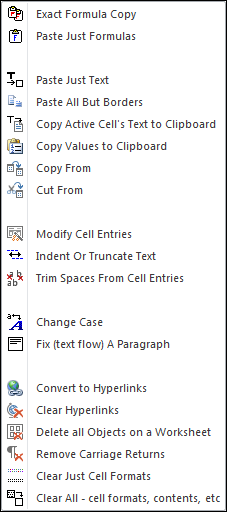
The Edit Assistants menu is full of useful features. The ones you choose to use will depend heavily on the work you need to do. We have found that the Change Case feature is very useful. We also use the Copy Active Cell’s Text to Clipboard a lot — this keeps us from pasting images of cells into our emails, and lets us paste text and values only.
The Fix (text flow) A Paragraph feature lets you use Excel as a word processor!
If you have ever copy and pasted web pages into Excel, then you know such pages are full of hyperlinks and images of all sizes and shapes. Cleaning them manually is painful if not impossible. With the Clear Hyperlinks and Delete all Objects features, this becomes just a few seconds of work.
Automatically backup files when you open them and before you modify them.
Create your own toolbar of buttons to quickly format cells and rows.
Quickly find and go to any column via a descriptive list of all columns.
See a list of the past 100 files you have opened and re-open any of them.
Move from sheet to sheet with ease. View a list of all your sheets with one click.
Extract rows of data into columns for easy review and printing.