Backup Assistant
Automatically back up files when you open them and before you modify them.
File Assistants Menu — file management features for Microsoft Excel.
The following is the File Assistants menu that appears when you click on the File Assistants button. Any of the features can be added to Excel’s quick access toolbar for instant use any time.
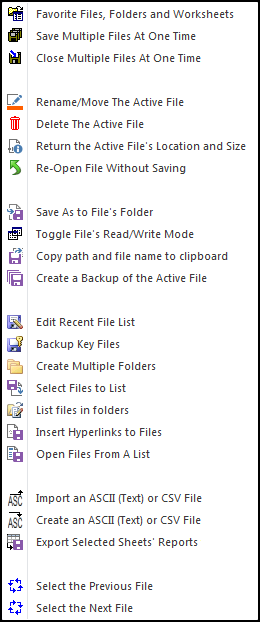
One of our favorite features on the File Assistants menu is the very first feature, Favorite Files, Folders and Worksheets. Instead of searching through folders for the file we want, it is always in our list of favorites.
If you ever need to email a file, then use the copy path and filename to the clipboard feature. Then in your email program, just do a Ctrl+V or right click and paste to tell it which file to email. It’s a great time saver.
The Save and Close Multiple Files features have proven very useful. They do just what they say! And the Delete the Active File feature helps keep our folders clean.
The Rename and Move the active file feature is very useful, especially when you realize that the name is not quite right or you want to change the file’s folder. Instead of closing the file, renaming and moving it via Windows Explorer, you can do it all with just one click.
Automatically back up files when you open them and before you modify them.
Create your own toolbar of buttons to quickly format cells and rows.
Quickly find and go to any column on a worksheet via a descriptive list.
See a list of the past 100 files you have opened and easily re-open any.
Move from sheet to sheet with ease. View a list of all your sheets with one click.
Extract rows of data into columns for easy review and printing.