Backup Assistant
Automatically backup files when you open them and before you modify them.
Part of the Spreadsheet Assistant — formatting tools that appear when you click the Format Assistants button.
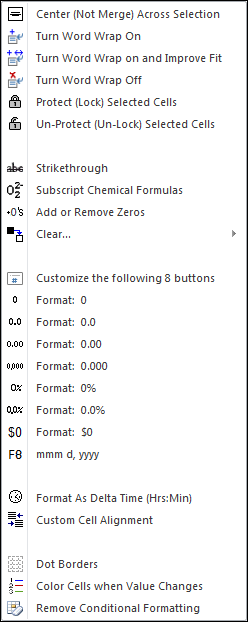
The following is the Format Assistants menu that appears when you click on the Format Assistants button. Any of the features can be added to Excel’s quick access toolbar for instant use any time.
Have you ever had a need to center text across columns and don’t want to use Excel’s merge cells feature? We added a feature that does centering without merging!
If you do a lot of formatting, the Spreadsheet Assistant provides 8 fully customizable format buttons for quick formatting exactly the way you want it done.
A very useful feature — and one that surprised us — is Color Cells When Value Changes. Often we are working with big lists and need to easily see when an entry in a column changes. By color coding such entries we don’t have to waste time reading!
Automatically backup files when you open them and before you modify them.
Create your own toolbar of buttons to quickly and easily format cells and rows.
Quickly find and go to any column on a worksheet via a descriptive list.
See a list of the past 100 files you have opened and easily re-open any file.
Move from sheet to sheet with ease. View a list of all your sheets with one click.
Extract rows of data into columns for easy review and printing.