Backup Assistant
Automatically backup files when you open them and before you modify them.
Part of the Spreadsheet Assistant — a menu full of functions that save you time with formulas and numbers.
The following is the Formula Assistants menu that appears when you click on the Formula Assistants button. Any of the features can be added to Excel’s quick access toolbar for instant use at any time.
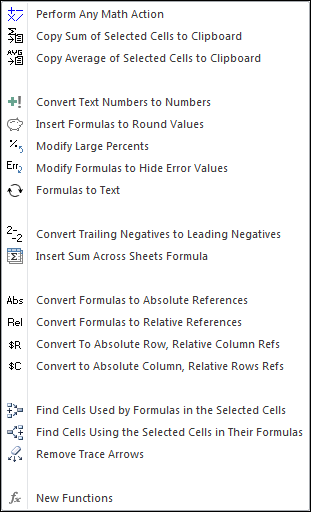
The Formula Assistants is full of functions that will save you time. One we use a lot is the
Perform Any Math Action feature. We just select a range of cells, click the menu item, type in
the action (ex: + 100, * 25, etc) and click OK. Instantly the cells are
modified — and existing formulas retained! It has saved us endless hours of work.
If you ever import numbers from the internet or from accounting systems like SAP, the numbers
that come in are either text entries that you can’t use because Excel doesn’t
recognize them as numbers, or they have the minus sign on the right (6-) instead of
the left (-6). The Spreadsheet Assistant adds two features that solve this problem:
Convert Text Numbers to Numbers and Convert Trailing Negatives to Leading Negatives.
The Spreadsheet Assistant also adds a number of useful functions to Excel. View a list of the new functions added to Excel.
Automatically backup files when you open them and before you modify them.
Create your own toolbar of buttons to quickly format cells and rows.
Quickly find and go to any column on a worksheet.
See a list of the past 100 files you have opened and re-open any of them.
Move from sheet to sheet with ease. View a list of all your sheets with one click.
Extract rows of data into columns for easy review and printing.