Backup Assistant
Automatically backup files when you open them and before you modify them.
Part of the Spreadsheet Assistant — quick inserting and editing tools for Microsoft Excel.
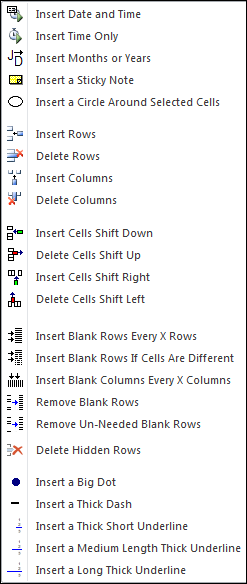
The following is the Insert Assistants menu that appears when you click on the Insert Assistants button. Any of the features can be added to Excel’s Quick Access toolbar for instant use any time.
The Insert Assistants menu has a number of useful features. Instead of typing an entry in a cell and hoping you will remember to see it the next time you open the workbook, you can use the Insert a Sticky Note feature. You have your choice of many bright colors and to make the sticky note printable or not printable.
The Insert and Delete Rows and Columns features make such editing a breeze. These are great ones to add to the Quick Access toolbar. We also added insert and delete cell buttons, which make working with worksheet to-do lists very easy.
If you ever need to delete a bunch of scattered blank rows, you will appreciate the Remove Blank Rows or Remove Un-needed Blank Rows features. Any of these features can be added to Excel’s Quick Access menu by right clicking on the menu item and selecting “Add to Quick Access Menu”.
Automatically backup files when you open them and before you modify them.
Create your own toolbar of buttons to quickly format cells and rows.
Quickly find and go to any column on a worksheet.
See a list of the past 100 files you have opened and re-open any of them.
Move from sheet to sheet with ease via a list of all your sheets.
Extract rows of data into columns for easy review and printing.