Backup Assistant
Automatically back up files when you open them and before you modify them, or back them up at your convenience.
The Options menu for the Spreadsheet Assistant add-in for Microsoft Excel.
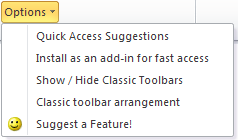
The following is the Options menu that appears when you click on the Options button. This button can be added directly to the Quick Access Toolbar for fast access.
The Spreadsheet Assistant actually has very few options. The first one offers some ways you can make better use of the Spreadsheet Assistant. Its number one suggestion is to add Spreadsheet Assistant features to the Quick Access Toolbar!
The Spreadsheet Assistant is an “on demand” add-in, like all our add-ins. That means it doesn't load until you need it. However, if you use it all the time, you might not want to wait the second or two it takes to load the first time you click on a feature during an Excel session. So, we added an option to have it auto-load as an add-in when you open Excel.
The most important item on this menu is the last one: Suggest a Feature. We hope to hear from you on your Excel needs and how we can add features to save you time.
Automatically back up files when you open them and before you modify them, or back them up at your convenience.
Create your own toolbar of buttons to quickly and easily format cells and rows.
Quickly and easily find and go to any column on a worksheet via a descriptive list of all the columns.
See a list of the past 100 files you have opened. Easily re-open any file.
Move from sheet to sheet with great ease. View a list of all your sheets with one click.
Extract rows of data into columns for easy review and printing.