Backup Assistant
Automatically backup files when you open them and before you modify them.
The Print Assistants menu of the Spreadsheet Assistant add-in for Microsoft Excel.
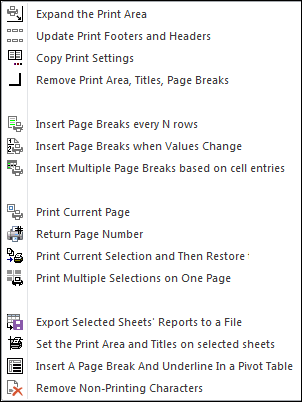
The following is the Print Assistants menu that appears when you click on the Print Assistants button. Any of the features can be added to Excel's quick access toolbar for instant use any time.
The Expand the Print Area feature makes expanding the print area super easy. And the Update Print Footers and Headers makes changing the print footers and headers on multiple sheets super easy.
If you have a large spreadsheet, then you know what a pain it is to print just a particular page of a many page report. You have to set the print area, print the page and set it back — or guess what page it is you want to print. The Print Current Page solves this problem completely!
If you have imported a web page, then you will sometimes see many weird non-printing characters. The Remove Non-Printing Characters gets rid of this junk with just a click.
Automatically backup files when you open them and before you modify them.
Create your own toolbar of buttons to quickly format cells and rows.
Quickly find and go to any column on a worksheet.
See a list of the past 100 files you have opened and re-open any of them.
Move from sheet to sheet with great ease via a list of all your sheets.
Extract rows of data into columns for easy review and printing.