Backup Assistant
Automatically backup files when you open them and before you modify them.
The Sheet Assistants menu of the Spreadsheet Assistant add-in for Microsoft Excel.
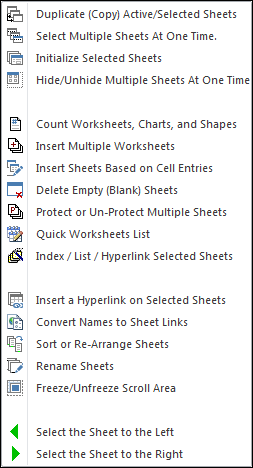
The following is the Sheet Assistants menu that appears when you click on the Sheet Assistants button. Any of the features can be added to Excel's quick access toolbar for instant use any time.
Imagine if you had to add 30 sheets and they all needed names that you had entered into cells in a worksheet. About 5 minutes later, you're done. With Insert Sheets Based on Cell Entries, all you do is select the cells and run this feature — and enjoy the next 4 minutes and 55 seconds doing what you want!
If you have many sheets, it is often nice to have an index of the sheets. Even better is an index of hyperlinks to the sheets — and even better than that is a link on each sheet back to the index sheet! The Index / List / Hyperlink Selected Sheets feature does that. And if you want all sheets done, you don't need to select the first — it volunteers to do all of them for you.
If you need to re-arrange sheets you know how painful that is. With Sort or Re-Arrange Sheets, a dialog pops up that lets you decide on the order you want and then it arranges the sheets for you.
Automatically backup files when you open them and before you modify them.
Create your own toolbar of buttons to quickly format cells and rows.
Quickly find and go to any column via a descriptive list of all columns.
See a list of the past 100 files you have opened and easily re-open any file.
Move from sheet to sheet with ease. View a list of all your sheets with one click.
Extract rows of data into columns for easy review and printing.