Backup Assistant
Automatically back up files when you open them and before you modify them.
Part of the Spreadsheet Assistant add-in for Microsoft Excel — switch between and arrange open workbook windows with a click.
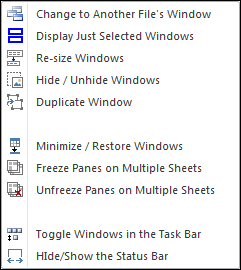
The Window Assistants menu appears when you click on the Window Assistants button. Any of the features can be added to Excel’s Quick Access Toolbar for instant use any time.
The first feature, Change to Another File’s Window, displays a small floating dialog of the different workbooks that are open. With just a click, you can switch back and forth between files — no more clicking the View tab, finding the Switch Window button, and then clicking again on a file.
The second feature, Display Just Selected Windows, is extremely useful when you have a half dozen or more workbooks open and want to see just two or three on the screen in a horizontal or vertical arrangement. Click the menu item, select the sheets you want to see and the arrangement, and click OK. It makes a painful task simple.
Automatically back up files when you open them and before you modify them.
Create your own toolbar of buttons to quickly format cells and rows.
Quickly find and go to any column on a worksheet via a descriptive list.
See a list of the past 100 files you have opened and easily re-open any of them.
Move from sheet to sheet with ease — view a list of all your sheets with one click.
Extract rows of data into columns for easy review and printing.